
If you’re using volume-based indicators such as:
- Quantum Vol-Delta
- Sonarlike Iceberg Finder
- Omnispectrum Scan
- Imbalance Volume Sensor
- …
you may already know that these indicators require Tick Replay to be enabled in order to display historical performance.
But sometimes you might meet this issue: “Tick Replay is already ON, why am I still not seeing any signals?”🤔
Don’t worry 😊
Your indicator is not broken at all. In most cases, this is simply a data issue.
So, the fix is very simple: download more historical data!
Just a few easy steps for you here:
Step 1: At your Control Center → go to Tools → select Historical Data

Step 2: Choose the instrument you want to add data for, the time range, intervals and data type.
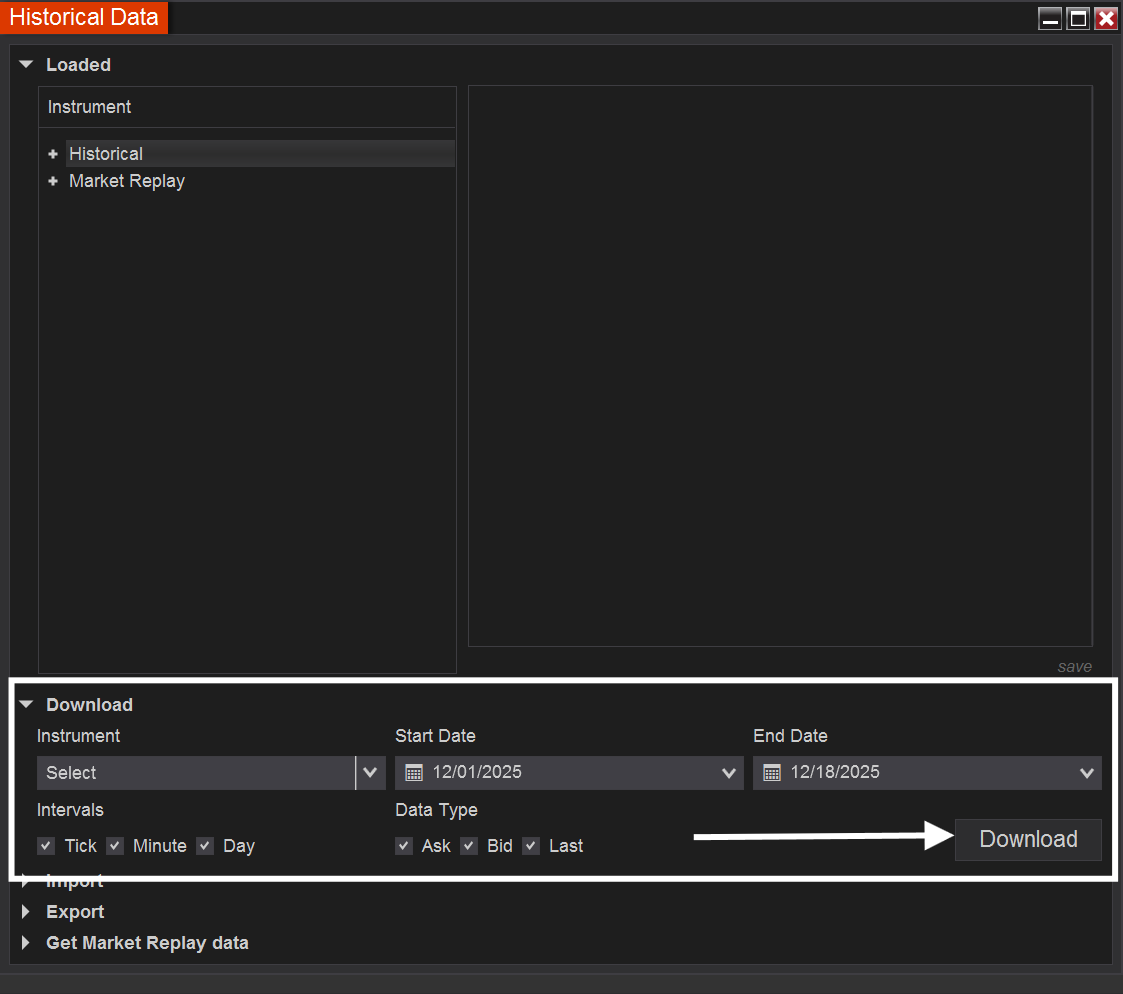
Step 3: Click Download and press F5 to refresh your charts.
That’s done, my friend! Super easy for you.
As long as Tick Replay is enabled and historical data is fully downloaded, everything should work smoothly again for you!✨
If you have any other questions,
💬 please don’t hesitate to contact us, we’re always happy to help.
See you in our next blog post, friend.
Happy trading!
Leave a Reply