
ninZaResources is an important file for our indicators to run and perform seamlessly on NinjaTrader 8. To keep up with NinjaTrader 8 updates, we often release new versions of ninZaResources.
That’s why you may occasionally see your indicators stop working and some situations like below.

Hi guys: I need your help to extend the expiration date of the Indicators I have with you. My products don’t appear in downloads on your website. Please tell me how to do it, because Ninja Trader already told me that I won’t be able to use your Indicators soon.
I purchased ParabolicSAR Pro, then imported the NinjaScript Assembly, and it’s not showing up in my list of available ninza.co indicators. Please assist.
NinzaPANA kana indicator installed NT8 but not appearing in chart indicator list. The indicator NinzasidwayzRT is installed and running properly. Ive checked the NT8 Bin/Custom folder and the PanaKana files are there. Just doesnot appear on a chart.
The solution is simple. Please folow 3 steps below:
- Step 1: Check your current NinjaTrader 8 version (Important: minimum required version is 8.1.2 or higher)
- Step 2: Download the latest version of ninZaResources in your dashboard → https://ninza.co/customer/downloads (located in the Prerequisite section)
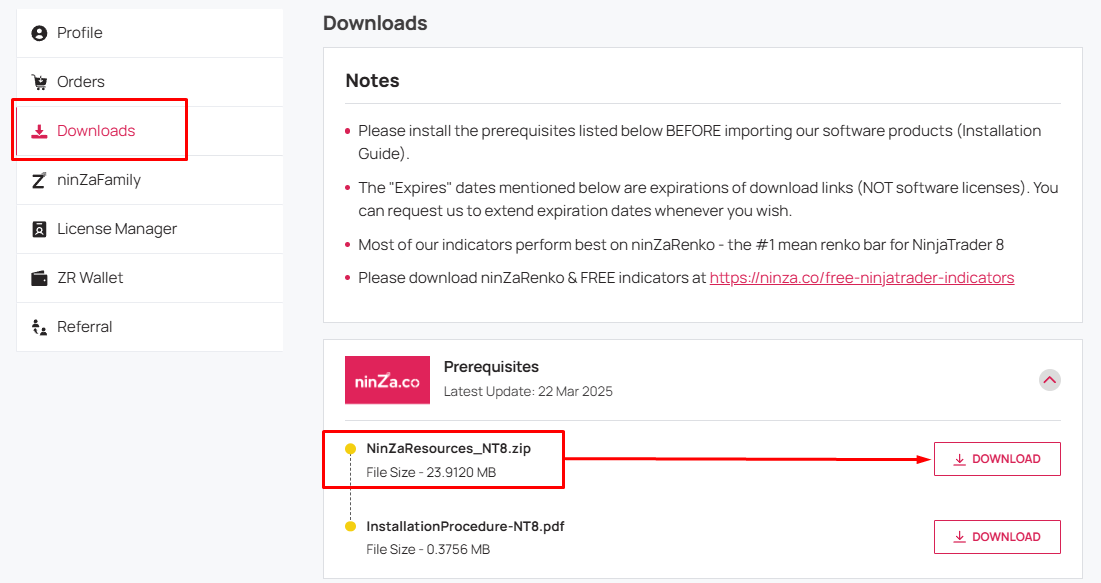
- Step 3: Import it into NinjaTrader 8 and choose “Yes” for any prompt questions.
- Step 4: Restart NT8 and test your indicators again.
After doing this, the ninZaResources file will be updated and your indicators should be working again.
If you have any questions or need further help, don’t hesitate to reach out to our support team via support@ninza.co. We’re here to assist you promptly.
Note: Please double-check your NinjaTrader 8 version first.
Versions older than 8.1.2 may freeze or crash after updating to the new ninZaResources.


Leave a Reply to SpencerCancel reply